Tomato Dragon
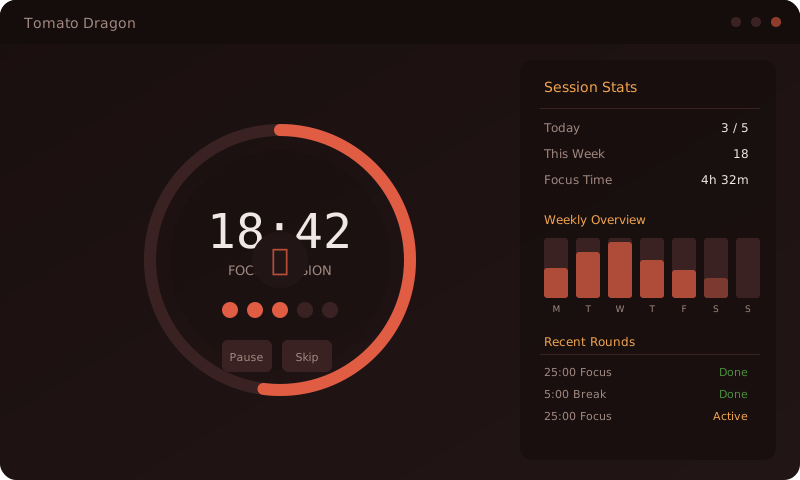
A Rust Pomodoro timer with persistent tasks, session history, daily goals, and progress charts. The same egui application targets desktop and the browser.

Persistent session history
Completed and skipped rounds are recorded in platform storage with their phase, actual duration, and completion state. Desktop uses a local data path; the WASM build uses browser-backed storage.
The whole thing is one immediate-mode egui tree. There is no
DOM, no template layer and no state library: the UI is a pure function of
the timer, task and stats structs, redrawn every frame.
Current features
Timer and sessions
Work and break phases with numbered sessions, and a start / pause / reset / skip control set. Sessions can also be started by hand rather than rolling on automatically.
Task tracking
Tasks carry state across rounds and persist between launches through
eframe’s storage layer, so closing the window does
not reset the day.
Stats with switches
Two graph modes, This Week and Sessions, with independent Work and Breaks toggles. Rounds you skipped out of are logged and labeled as skipped rather than dropped.
Your data, movable
Backup, restore and reset, each behind a confirmation step, plus a JSON report you can generate and save if you want to chart the numbers somewhere other than the app.
The tomato budget
The settings include a daily tomato goal and a policy for when the counter returns to zero. The labels below match the current alpha build.
- Erry Day
- Counter resets at the day boundary. This is the default.
- Erry Sess
- Counter resets at the start of each new session.
- Never
- Counter accumulates for as long as the data file lives.
One codebase, two render targets
The same crate builds for the desktop and for the browser. Platform
differences are confined to cfg-gated dependency blocks. Timer,
task, and statistics logic are shared; storage paths and notifications use
platform-specific adapters.
| egui / eframe 0.29 | Immediate-mode UI, glow renderer, accesskit enabled for platform accessibility |
| Rust 1.76+ | Edition 2021; release profile builds with LTO |
| serde · serde_json | Settings, stats and the saved report |
| chrono | Day boundaries and week bucketing for the graphs |
| Native only | notify-rust for desktop notifications, directories for the data path |
| WASM only | wasm-bindgen and web-sys, with the browser Notification API in place of notify-rust |
Version 0.1.0. The desktop and WASM targets both build and the test suite (58 tests) runs in the pre-push gate, but there are no tagged releases yet: no installer, no hosted demo, and the repository is private.
No installer or browser demo has been published.
The project began as an experiment in maintaining an immediate-mode GUI beyond a small demo. Shared state remains straightforward, while view-local state such as scroll position requires more deliberate handling across redraws.