AoE2 HD Crossover
A documented offline compatibility setup for running a legally owned copy of Age of Empires II HD on Apple Silicon, without Windows or a paid compatibility layer.
Age of Empires II HD Edition is a 2013 Windows release with no native Apple Silicon client. This project documents the compatibility work needed to run that specific edition offline on an M1 Mac.
The challenge was threefold. First, the binary is a 32-bit x86 Windows executable; Apple Silicon speaks arm64. Second, the game depends on DirectX 9 and the Steam API; neither exists on macOS. Third, the Steam desktop client failed in the tested Wine environment because of its Chromium-based web helper and authentication dependencies.
This project predates my copy of AoE2: Definitive Edition and targets the HD Edition specifically. The stack has been tested offline only: single-player skirmish and campaign. Online multiplayer through Steam is outside its scope.
The setup combines open-source compatibility components with proprietary tools supplied by Apple and Valve. A CrossOver-derived Wine build provides Windows API support, including its 32-bit-on-64-bit path, while Rosetta 2 translates the x86_64 host-side Wine process for Apple Silicon.
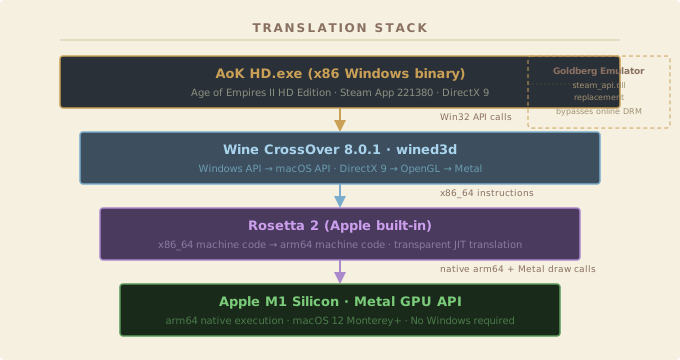
Getting a working game required diagnosing errors across four independent translation boundaries. Most error messages were cryptic, most documentation was fragmented or Windows-specific. Three non-obvious problems stood between "install Wine" and "game running."
DXVK (the modern DirectX-over-Vulkan bridge) is widely recommended for
Wine gaming, but it causes a fatal crash on AoE2 HD. DXVK requests the
geometryShader and shaderFloat64 Vulkan features;
Metal on Apple Silicon does not expose either. The fix: force wined3d
(the older OpenGL bridge) via WINEDLLOVERRIDES="d3d9=b;dxgi=b;d3d10core=b;d3d11=b",
which routes rendering through OpenGL → Metal instead. The error message
("Failed to initialize draw system") gives no hint of the real cause.
The Steam desktop client crashes immediately under Wine because
steamwebhelper depends on a bcryptprimitives.dll →
chrome_elf.dll initialisation chain that Wine does not support.
For an already licensed copy, SteamCMD supplied the game files and a local
Steam API replacement allowed offline single-player testing without the
desktop client. Multiplayer and online Steam features were not tested.
The game crashes with "FATAL: Storage Point #12 does not exist" when
launched from the wrong working directory. Its relative paths for
resources\_common\drs\ only resolve if Wine is launched
with the game folder as the working directory. The fix: use
wine start /d "C:\path\to\game" AoKHD.exe rather than
a plain wine AoKHD.exe call.
Most compatibility components are open source, while Rosetta 2 and SteamCMD are proprietary platform tools. The project documents the tested versions, errors, and configuration so the setup can be reproduced against a legally owned copy.
| Component | Role | Licence |
|---|---|---|
| wine-crossover | Windows API translation layer | LGPL-2.1 |
| wined3d | DirectX 9 → OpenGL → Metal renderer | LGPL-2.1 |
| Rosetta 2 | x86_64 → arm64 JIT translation (Apple built-in) | Apple proprietary · free |
| gbe_fork (Goldberg) | Local Steam API replacement for offline testing | MIT |
| SteamCMD | Headless CLI game installer | Valve · free |
| winetricks | Wine prefix configuration helper | LGPL-2.1 |
| MoltenVK | Vulkan → Metal (for other games in the prefix) | Apache 2.0 |